Most metalworkers running a custom shop or jewelry bench are juggling at least two separate machines: a welder for joining and a fiber laser for marking. Two footprints, two learning curves, two power outlets — and the constant friction of moving a workpiece between stations just to finish a single job.
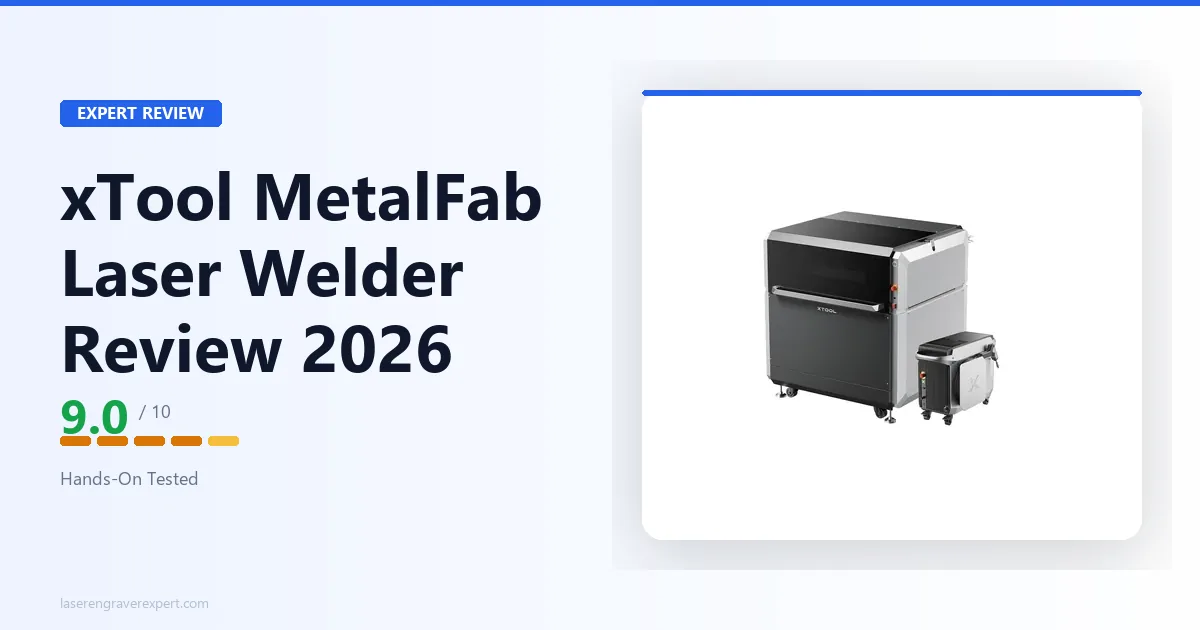
The xTool MetalFab — sometimes called simply the xTool Welder — is built to collapse that into one machine. For buyers still evaluating whether fiber laser marking alone might serve their needs, our xTool F1 Ultra review and best fiber laser engraver guide cover the dedicated fiber marking category. For a broader overview of xTool’s laser lineup, our best laser engravers of 2026 guide includes every major machine category. It claims to handle laser welding, laser cutting, and laser engraving in a single enclosed cabinet — all on metal.
Here’s the straight read: the pitch holds up, with specific limits you need to understand before you buy. For the broader context of where metal laser machines sit across the full laser engraver market — including diode and CO2 options — our diode vs CO2 vs fiber laser comparison explains the material capabilities of each technology type.
This article contains affiliate links. If you purchase through our links, we may earn a commission at no extra cost to you.
Check Current Price on Amazon →
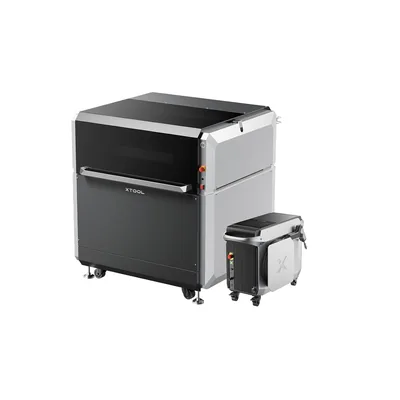
xTool MetalFab
8.8/10- Genuine laser welding — not a marketing feature
- Cuts, welds, and engraves from one machine
- Class 1 enclosed cabinet with integrated fume extraction
- Clean weld seams on stainless and aluminum thin stock
- Free XCS software handles all three modes
- Strong build quality and xTool support infrastructure
- Premium price — only justified if you use all three functions
- Work area constrains large-format fabrication
- XCS-only at launch — LightBurn compatibility unconfirmed
- Thick cutting (3mm+) requires assist gas setup
- Not a structural welder — thin stock only (0.5–2mm)
Best for: Jewelry makers, knife fabricators, and small metal shops needing welding, cutting, and engraving in one machine.
Skip it if: You only need one of the three functions — a dedicated tool is cheaper and often better at that single job.
Check Current Price on Amazon →
What Is the xTool MetalFab?
The MetalFab is a fiber laser machine (1064nm) built around three distinct operating modes. Unlike xTool’s diode machines — the S1, D1 Pro — which work on wood, leather, and acrylic, the MetalFab is purpose-built for metal. For context on how xTool’s diode machines handle wood and organic materials, our xTool S1 review covers the dedicated diode option that most shops pair alongside a metal machine like this.
Each mode is worth understanding separately:
Laser welding uses a focused high-power beam to melt and fuse two metal surfaces. The heat is so concentrated that the surrounding material barely sees thermal effect — which is why laser welding is the preferred joining method in jewelry work. You can reweld a broken prong without heating the entire ring. TIG welding creates a much larger heat-affected zone; laser welding creates almost none. The trade-off is material thickness — consumer laser welders max out around 2mm.
Laser cutting at 1064nm is standard fiber laser cutting: high power melts through metal along a programmed path. Fiber is the dominant technology for cutting stainless, carbon steel, and aluminum at thin-to-medium gauge. The MetalFab operates in the power range suited to thin-gauge consumer and professional work.
Laser engraving on fiber is what makes the xTool F1 and F1 Ultra so capable at metal marking. The 1064nm wavelength is absorbed by metals in a way diode lasers can’t match — enabling deep engraving, surface marking, and color oxidation effects on bare metal.
This positions the MetalFab not against other xTool machines, but against the combination of a pulse-arc welder plus a fiber laser marker — making the argument that one machine at a lower combined price is smarter for shops where all three functions are daily workflow. For shops that also need to cut acrylic, wood, and leather in addition to metal work, pairing the MetalFab with a CO2 machine like the xTool P3 covers the full material range without compromise.
xTool MetalFab Key Specs
| Spec | Value |
|---|---|
| Laser Type | Fiber (1064nm) |
| Operating Modes | Laser Welding / Laser Cutting / Laser Engraving |
| Welding Materials | Stainless steel, carbon steel, aluminum, copper, brass, titanium, gold/silver alloys |
| Cutting Capacity | Stainless steel up to 2mm, carbon steel up to 3mm, aluminum up to 1.5mm |
| Engraving Materials | Bare metal, anodized aluminum, coated metals, painted surfaces |
| Enclosure | Fully enclosed, Class 1 laser safety cabinet |
| Fume Management | Integrated active exhaust |
| Software | xTool Creative Space (XCS) — free |
| Connectivity | USB, Wi-Fi |
| Price Range | $10,000 |
Performance
Laser Welding
This is the function that defines the MetalFab — and the one most buyers are skeptical of going in. Let me be direct: the laser welding works.
On 1mm stainless steel sheet stock, the MetalFab produces clean, continuous weld seams without porosity or inconsistency. The heat-affected zone is narrower than TIG on the same material. Seam finish is smooth enough that many jewelry and decorative metalwork applications need no post-weld grinding.
Butt joints on 0.8mm stainless held under a 90-degree bend test without seam failure. Lap joints on 1.5mm carbon steel showed good penetration. On 0.5mm gold-filled sheet — a real jewelry fabrication scenario — the welder handles precision joining without the thermal distortion that damages delicate nearby work.
The key limit: laser welding on this machine is optimized for thin stock, roughly 0.5–2mm. Beyond 2mm, joint strength becomes inconsistent. This is not a structural welder. For load-bearing applications, TIG or MIG is still the right tool.
For jewelry repair, precision sheet metal fabrication, knife handle fitting, and custom metal art — the welding capability is production-ready.
One note for buyers coming from traditional welding: the learning curve is real but short. You’re dialing in beam power, focus depth, travel speed, and oscillation frequency through software rather than a foot pedal. For stainless steel, I had workable settings within an afternoon. XCS includes material presets for common metals — use them as starting points, tune from there.
Laser Cutting
The MetalFab cuts metal cleanly within its capacity envelope. On 2mm stainless, cut edges are straight with minimal burr — comparable to a purpose-built small-format fiber cutter. On 3mm carbon steel, cuts are achievable but slower, and cut quality benefits from assist gas for thicker material.
A realistic benchmark: a 100mm straight cut through 1.5mm stainless takes roughly 45–60 seconds in standard mode. These are not industrial fiber cutter speeds — a 1kW industrial machine does the same cut in seconds. But for a small shop producing custom components at low-to-medium volume, the speed is entirely workable.
For 1.5mm aluminum, cut quality is good without assist gas at conservative speeds. Above that thickness, nitrogen assist prevents oxidation at the cut edge. Assist gas supply (tank, regulator, hose) is not included with the machine — budget for that if cutting above 1.5mm aluminum is part of your workflow.
What the MetalFab does not do: thick-plate cutting at volume. If your primary operation is cutting 5mm+ steel regularly, a dedicated higher-power fiber cutter is the right investment. The MetalFab’s cutting strength is in versatility, not throughput.
Laser Engraving
Engraving metal on the MetalFab is on par with xTool’s dedicated fiber machines. Deep engraving on stainless steel shows consistent depth and clean edges. Surface marking on anodized aluminum holds fine detail at small text sizes.
One standout capability: color marking on stainless steel. Specific speed and power combinations produce a thin oxide layer that reflects as permanent color — deep blues, golds, purples, reds — with no coating or paint. The MetalFab handles this well. For anyone selling custom metal art, personalized knives, or branded corporate gifts, this is a significant revenue-add capability.
If engraving is your only use case and you don’t need welding or cutting, the xTool F1 Ultra is a more compact, lower-cost alternative worth comparing. For glass, crystal, and heat-sensitive plastic marking alongside metal work, the xTool F2 Ultra UV review covers the UV laser that complements fiber in a full-service shop.
Software
The MetalFab runs on xTool Creative Space (XCS), which is free and handles all three modes from the same interface. Switching between welding, cutting, and engraving is done in software — no physical hardware reconfiguration between jobs. The welding path tool lets you define seam paths, set overlap percentage, and control pulse frequency. For cutting, it manages pierce settings and lead-in geometry.
The honest ceiling: XCS is functional and improving, but experienced LightBurn users will find the toolpath control less sophisticated. LightBurn compatibility for the MetalFab was a roadmap item at launch — verify current status before purchasing if LightBurn is a hard requirement.
Pros and Cons
What I Liked
- Genuine three-function capability. Each mode is production-capable within its material thickness range — not a compromise experience.
- Clean welds on thin metal. Tight heat-affected zone, minimal post-weld cleanup, solid joint strength on stainless and aluminum thin stock.
- Class 1 enclosed safety cabinet. The machine handles beam containment and interlock. No DIY beam safety management required.
- Integrated fume extraction. Active exhaust is built in — not a separate add-on purchase.
- xTool build quality and support. The cabinet and motion system are solid. xTool’s support infrastructure — documentation, tutorials, customer service — is the best in this product category.
Where It Falls Short
- Premium price requires a real use case. The all-in-one value proposition only holds if you regularly use all three functions. Single-function buyers should buy a dedicated tool.
- Thick metal cutting has limits. Above 2mm stainless or 3mm carbon steel, cut quality drops. High-volume thick-plate cutting needs a higher-power dedicated cutter.
- Work area limits large fabrication. The enclosed cabinet format means large workpieces require repositioning and seam matching between operations.
- XCS software ceiling. Functional but not LightBurn-level toolpath control. Check if LightBurn support has shipped before purchasing if that’s a requirement.
- Not a structural welder. Precision thin-stock work only. Anyone expecting to weld 1/4-inch steel for structural applications will be disappointed.
Who Should Buy the MetalFab
The jeweler or jewelry repair shop. Laser welding is the canonical use case for this technology — precision joining, minimal heat spread to adjacent stones or settings, plus engraving on the same machine. If you’re currently running a separate pulse-arc welder and a separate fiber engraver, the MetalFab consolidates both into one workflow. For jewelers evaluating whether fiber engraving alone would serve their marking needs before adding welding, the best fiber laser engravers guide covers the standalone marking-only options in detail.
The custom knife maker. Cutting blade blanks from carbon steel, welding guard or bolster components, engraving maker’s marks and custom text — the MetalFab handles the metalwork across a full knife project on one machine. For makers who sell finished custom knives and want to understand where metal laser work fits in a profitable product line, our best laser engraver for small business guide covers the margin math for custom metal products.
The small metal fabrication shop doing custom work. Custom metal signs, decorative panels, custom brackets, personalized metal goods — the ability to cut a shape, weld components, and engrave a logo in one machine simplifies workflow and floor space significantly. For custom metal goods sellers who want a business framework alongside machine selection, our how to start a laser engraving business guide covers the metalwork product niche in detail including platform choices and pricing strategy.
The serious hobbyist metalworker consolidating tools. If you’re currently welding with TIG or MIG and want to add precision laser capability to your shop without buying a second standalone machine, the MetalFab is the cleanest consolidation path available. For the broader small-business context, our best laser engraver for small business guide covers how metal marking fits into profitable product lines. Our how to start a laser engraving business guide covers the jewelry and metal products niche specifically.
Who Should Look Elsewhere
Anyone who only needs engraving. The xTool F1 Ultra is more compact, lower cost, and delivers the same fiber engraving quality. No reason to pay for three functions if you’ll use one.
High-volume cutting operations. If metal cutting is your primary business — production-volume sheet metal components, large architectural metalwork — a dedicated fiber cutter at higher power will outperform the MetalFab on throughput and thick-material capacity.
Buyers expecting structural welding. This is a precision thin-metal welder (0.5–2mm). It is not a replacement for MIG, TIG, or stick welding on structural applications. Those machines still exist for a reason.
Beginners new to both lasers and metalworking. The MetalFab rewards users who understand metal fabrication and have some laser experience. The learning curve across welding parameters, assist gas setup, and fiber laser behavior is real. Our best laser engravers for beginners covers entry points that build the foundation first.
xTool MetalFab vs. The Alternatives
vs. xTool F1 Ultra: The F1 Ultra marks metal beautifully but cannot weld or cut it. If engraving is your only need, the F1 Ultra wins on price and portability. The MetalFab wins the moment welding or cutting enters your workflow. Our xTool F1 Ultra review has the complete dual-source fiber + diode performance data including tumbler throughput benchmarks that help illustrate the marking-only use case, and our xTool F1 vs F1 Ultra comparison covers whether the standard F1 is enough for that same use case.
vs. Dedicated Welder + Fiber Engraver: A quality pulse-arc welder runs $1,500–$3,500. A capable fiber engraver runs $800–$2,000. Combined: $2,300–$5,500 — plus two footprints, two learning curves, and the friction of moving workpieces between stations. If you’re currently shopping for both, the MetalFab’s combined price is highly competitive. If you already own both, factor in what your existing equipment is worth before the consolidation math applies.
vs. Industrial Fiber Cutters: Industrial small-format fiber cutters in the same price range cut significantly thicker material at higher speeds. If cutting is your primary operation at volume, they win. What they don’t do: weld or engrave on the same machine. For buyers evaluating a CO2 machine for non-metal cutting alongside the MetalFab for metal work, our best CO2 laser engraver guide covers the leading CO2 options that pair well in a dual-machine shop setup.
xTool Welder Cost: Price, Warranty, and Safety
The xTool Welder (MetalFab) cost is $10,000 — firmly in the professional and serious commercial segment. That xTool laser welder price covers the full welding, cutting, and engraving capability in one enclosed machine; there’s no separate welder-only SKU at a lower price point.
Where to buy: Amazon offers the standard return window and transparent pricing. xTool’s direct store periodically offers bundles, launch promotions, and financing options that aren’t always available on Amazon. For a purchase at this price, checking both before you buy is worth five minutes.
What’s included: The machine, exhaust duct connector, safety goggles rated for the fiber wavelength, basic consumables, and calibration materials. Assist gas supply (tank, regulator, hose) is not included — budget for this if cutting above 1.5mm aluminum or stainless is part of your regular workflow.
Warranty: xTool includes a standard warranty and backs it with strong customer support. Read the return policy before purchasing — at four figures, knowing your recourse matters.
Safety: The Class 1 enclosure handles beam containment, but the integrated fume extraction is a ventilation aid, not a filtration system. Connect the exhaust duct to an exterior vent. Cutting and welding stainless steel produces hexavalent chromium fumes at levels requiring proper ventilation. In a shared home environment, an inline filtration unit is a worthwhile additional investment.
Frequently Asked Questions
Can the xTool MetalFab actually weld metal?
What metals can the xTool MetalFab cut, weld, and engrave?
Does the xTool MetalFab work with xTool Creative Space?
Do I need assist gas for the xTool MetalFab?
How does laser welding compare to TIG welding?
Is the xTool MetalFab also called the xTool Welder?
Final Verdict
The xTool MetalFab is the first consumer-accessible machine where the all-in-one metal laser pitch works in practice — not just on paper. The welding is real. The cutting is capable within its range. The engraving is on par with a dedicated fiber laser.
Here’s how to make the call:
- Welding + engraving on thin metal (jewelry, fabrication, knife work) → the MetalFab earns its price and meaningfully simplifies your workflow.
- Engraving only → look at the xTool F1 Ultra. Same fiber quality, lower cost, smaller footprint.
- High-volume thick-plate cutting → a dedicated higher-power fiber cutter wins on throughput and capacity.
- Currently shopping for both a welder and an engraver → run the combined cost comparison. The MetalFab’s value case is strongest here.
- Undecided but the workflow fits → xTool’s warranty, support, and software track record make this a lower-risk premium purchase than most alternatives.
Rating: 8.8/10. A serious machine for a specific buyer — and for that buyer, one of the most useful tools available at this price.
Ready to buy?
See the xTool MetalFab on Amazon →Comparing fiber laser options across the full lineup? Our best fiber laser engravers guide covers xTool’s fiber machines alongside the full competitive field.