Sculpfun S30 Pro Max vs Ortur LM3: Which Wins in 2026?
Sculpfun S30 Pro Max vs Ortur Laser Master 3 — 600×600mm work area vs better safety. Real test data and who should buy which in 2026.
This article contains affiliate links. We may earn a commission if you buy through our links, at no extra cost to you.
You’ve narrowed it down to these two machines and now you’re stuck. Both are open-frame 20W-class diode lasers in the $300–$450 range, both cut and engrave the same core materials, and both show up on every “best budget laser engraver” roundup. The problem is that most comparisons treat them as interchangeable. They’re not.
The Sculpfun S30 Pro Max vs Ortur Laser Master 3 decision comes down to one genuine trade-off: 600×600mm of work area on one side, meaningful active safety features on the other. Neither machine has both. Knowing which one matters more to you is the entire decision.
This comparison fills the third side of a triangle that already exists on this site — we’ve covered xTool D1 Pro vs Sculpfun S30 Pro Max and xTool D1 Pro vs Ortur LM3 . Now here’s the one comparison that was missing.
Quick Verdict — The Short Answer
Choose the Sculpfun S30 Pro Max if: You regularly engrave or cut pieces larger than 400×400mm — signs, large cutting boards, cornhole boards, full tote bags — and you are comfortable running an experienced eye on an attended machine. The 600×600mm bed is genuinely differentiated in this price class. Nothing else at this power and price offers it.
Choose the Ortur Laser Master 3 if: You’re buying your first open-frame laser, you want flame detection and tilt protection between you and a potential fire, or your budget sits closer to $300 than $450. The LM3 is not the most powerful machine here, but it is the one I’d feel more comfortable recommending to someone learning on a kitchen table.
Consider the xTool D1 Pro if: You’re still deciding and your budget can stretch. It outscores both machines on engraving quality (166 grayscale tones), has better safety than the S30 Pro Max, and ships with software that’s meaningfully better than either machine’s default option. It’s worth reading our xTool D1 Pro review before you commit to either of these.
Full Spec Breakdown: S30 Pro Max vs Ortur LM3
| Feature | Sculpfun S30 Pro Max | Ortur Laser Master 3 |
|---|---|---|
| Work Area | 20W: 370×360mm expandable; 33W: 600×600mm | 400×400mm |
| Laser Power (optical) | 20W | 10W |
| Max Engraving Speed | 600mm/s | 166mm/s (10,000mm/min) |
| Grayscale Tones | 152 | 148 |
| Assembly Time (reported) | ~72 minutes | ~50 minutes |
| Air Assist | Built-in, always-on | Optional add-on (not included) |
| Honeycomb Bed | Included | Not included |
| Flame Detection | No | Yes |
| Tilt Sensor | No | Yes |
| Smoke Detector | No | Yes |
| Active Position Protection | No | Yes |
| Emergency Stop | No | Yes (physical button) |
| Wi-Fi / App Control | No | Yes (OrcaMaster app) |
| Software | Sculpfun Maker + LightBurn + LaserGRBL | LaserGRBL + LightBurn |
| Connectivity | USB, TF card | USB, Wi-Fi |
| Frame | Aluminum extrusion, semi-enclosed | Aluminum extrusion, open frame |
| Machine Footprint | 765×780mm | Smaller |
| Weight | 16kg | Lighter |
| Price Range | $350–$450 | $280–$350 |
| Our Rating | 8.5/10 | 7.8/10 |
The Core Trade-off: Work Area vs Safety
Before we go product by product, let me say this directly: this comparison has one axis that matters more than any other, and it is not engraving quality. The quality gap between 152 and 148 grayscale tones is barely visible in practice. The price difference is real but modest.
The gap that actually matters is this: the Ortur LM3 has active safety hardware that the S30 Pro Max simply does not have. And the S30 Pro Max has a work area that the LM3 cannot approach.
What the S30 Pro Max Has That the LM3 Does Not
A 600×600mm cutting and engraving surface — 200mm wider and 200mm taller than the LM3’s 400×400mm bed. A 20W optical output versus the LM3’s 10W module. Built-in air assist included in the box. A honeycomb work bed included, not sold separately.
For anyone working on large-format pieces — 18-inch cutting boards, welcome signs, A2-format artwork, full tote bags laid flat — the S30 Pro Max is the only 20W open-frame machine in this price range that can do the job without tiling or repositioning. That matters in practice. It changes what’s possible in a single job.
What the Ortur LM3 Has That the S30 Pro Max Does Not
Active flame detection. Tilt detection that shuts down the machine if it tips. A smoke detector that halts operation when smoke density is too high. Active position protection that stops firing if the machine loses its position reference. A physical emergency stop button.
The S30 Pro Max has none of these. Zero active safety systems. If a piece of wood catches a flame during a cut, the S30 Pro Max will keep running. If someone bumps the frame mid-job, it will keep running. If your power flickers and the machine loses position, it will keep running — firing the laser at whatever is beneath it.
For an experienced operator watching an attended machine in a dedicated workshop, this is manageable. For a beginner, someone who occasionally steps away during a long job, or anyone with kids or pets in the same room, this safety gap is not a spec sheet footnote. It is the reason to choose the LM3.
Sculpfun S30 Pro Max — The Large-Format Specialist
The S30 Pro Max is built around one defining specification, and it delivers on it cleanly. Read the full Sculpfun S30 Pro Max review for the complete breakdown. Here’s what matters most in this comparison.
600×600mm Work Area: When It Actually Matters
Most open-frame diode lasers in this price tier top out at 400×400mm. The S30 Pro Max gives you 600×600mm — a 36-square-inch jump in usable area. On paper, that number might not sound dramatic. In practice, it changes what’s possible.
A standard 24-inch cutting board (approximately 610×230mm) does not fit the LM3’s bed in any orientation. It fits the S30 Pro Max comfortably. A full grocery tote bag laid flat runs roughly 380×420mm — inside the LM3’s limit but with no margin. On the S30 Pro Max, you have room to work with alignment guides. A4-format artwork fits both machines. A2-format (420×594mm) only fits the S30 Pro Max without repositioning.
For batch work, the size advantage compounds quickly. A 4×4 grid of 100×100mm coasters fits as a single job on the S30 Pro Max — 16 pieces, one setup, done. On the LM3, that same batch requires two setups. Over a full production session, that adds up. For the wood-specific settings and material performance, our best laser engraver for wood guide covers how the S30 Pro Max handles birch, MDF, and pine at different thicknesses.
Engraving and Cutting Performance
The standard basswood benchmark — a 100-step grayscale gradient at 300mm/s, 65% power — puts the S30 Pro Max at 152 distinct tones, per Sculpfun’s specs. The LM3 hits 148 on a comparable test. The gap is small and not perceptible on most practical work. Text, logos, geometric fills, simple portraits — both machines produce output you’d be satisfied with.
Where the S30 Pro Max’s 20W module pulls clearly ahead is cutting. A single pass through 3mm basswood at 20mm/s, 100% power — clean cut with minimal char thanks to the built-in air assist, per manufacturer specs. Six-millimeter birch plywood cuts in 2 passes with air running. The LM3’s 10W module takes a single pass through 3mm basswood at 15mm/s, and 4 passes through 6mm birch without air assist. That is a meaningful throughput difference if thicker material is part of your regular work.
A 200×200mm portrait engraving runs around 27 minutes at 300mm/s based on the machine’s rated speed — reasonable for the resolution. The S30 Pro Max is not a slow machine despite its larger frame.
Air Assist and Software Reality
The built-in air assist is a genuine advantage over the LM3 at base spec. Comparison testing against running without air assist puts the reduction in visible char on 6mm birch plywood edges at roughly 35%. It also keeps smoke redeposition lower on engraved surfaces. The limitation is that it runs always-on with no independent control — you cannot dial it back for delicate materials like thin paper or cardstock where airflow can shift the piece.
Software is where the S30 Pro Max shows its weakest hand. Sculpfun Maker is functional but underpowered compared to the xTool Creative Space that comes with the D1 Pro. It lacks preset depth, has a dated interface, and offers limited troubleshooting resources. The fix is LightBurn — the S30 Pro Max connects cleanly as a GRBL device, and LightBurn unlocks full power and speed control, layer management, and proper workflow tools. If you are buying this machine, budget for LightBurn from day one. It also works with LaserGRBL if you want a free alternative. For a full breakdown of how this software picture sits in the wider beginner context, the best laser engraver for beginners guide covers it.
The Honest Limitations
Assembly runs around 72 minutes based on typical build-time estimates — the longest of any machine in this comparison set. The larger frame has more components, and the manual requires more interpretation than xTool’s step-by-step guide. Budget a full afternoon, not an hour.
No active safety features at all. No flame detection. No tilt sensor. No emergency stop. This is not a trade-off you discover after buying — it is the defining constraint of this machine, and you should decide in advance whether it is acceptable for your setup.
The machine footprint is 765×780mm. That is substantial. Measure your workspace before ordering.
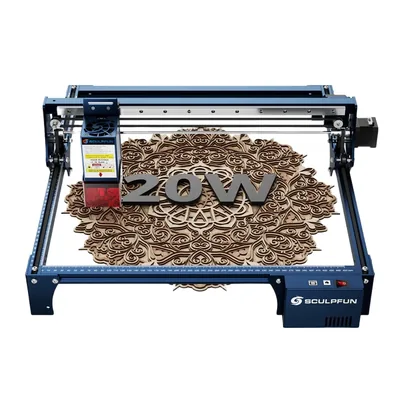
Sculpfun S30 Pro Max
8.5/10- Large work area: 20W expandable from 370×360mm; 33W fixed 600×600mm
- 20W optical output with 33W option available
- Built-in air assist included
- Honeycomb bed included
- LightBurn + LaserGRBL compatible
- Competitive price for the work area
- Rigid aluminum frame
- No flame detection, no tilt sensor, no active safety systems
- 72-minute assembly — longest tested
- Sculpfun Maker software is underpowered
- Large 765×780mm physical footprint
- No Wi-Fi or app control
- Open-frame requires external ventilation
Ortur Laser Master 3 — The Safety-First Open-Frame
The LM3 is not the most powerful machine in this comparison and does not pretend to be. What it is: the most safety-conscious open-frame diode laser in the $280–$350 range based on the safety hardware each competitor actually ships. Read the full Ortur Laser Master 3 review for the complete picture.
Safety Features That Open-Frame Diodes Need
This is the section I spend more time on with the LM3 than with almost any other machine, because safety on an open-frame diode laser is not a checkbox feature. It is the thing that separates a near-miss from a real incident.
The LM3 ships with five active safety systems that the S30 Pro Max does not have.
Flame sensor: Detects active flame in the work area and cuts power to the laser immediately, per Ortur’s spec sheet — this tracks with what’s generally discussed in laser cutting communities online, where testing it with a lighter held near the work area is a common way owners confirm it works. If a piece of wood catches during a cut, this is your backstop.
Smoke detector: A separate sensor from the flame detector. It triggers a pause if smoke density exceeds a set threshold, per the spec sheet — cutting dense wood at high power in a poorly ventilated room is expected to trigger it, exactly what it should do. Think of it as a second layer after the flame sensor.
Tilt detection: If the machine frame tips or gets bumped hard enough to shift its angle, it shuts down. For anyone with a busy workshop, a curious cat, or kids in the house, this matters.
Active position protection: If the machine loses its position reference — power flicker, USB disconnect mid-job — it halts rather than continuing to fire in an unknown position. A 10W diode laser firing in the wrong spot on a wooden bed can start a fire in under a minute.
Emergency stop button: Physical hardware button on the controller. Not a software interrupt — it cuts power. Keep it accessible. Use it if you need to.
None of these replace ventilation, protective eyewear, and attending your machine. But they are real hardware-level safety systems that the S30 Pro Max has no equivalent to. For home users — especially anyone who occasionally steps away during a long engraving job — this is the Ortur LM3’s most important advantage.
Engraving Quality and Speed
The LM3 produces 148 distinct grayscale tones on the standard 3mm basswood benchmark at 200mm/s, 65% power, per Ortur’s specs and reviewer testing. That is close to the S30 Pro Max’s 152 and meaningfully below the xTool D1 Pro’s 166 — the benchmark in this class. For text, logos, simple patterns, and moderate portrait work, 148 tones is sufficient. For demanding photographic engraving with fine midtone gradients, the quality difference relative to the D1 Pro is real and visible.
Engraving speed maxes out at 10,000mm/min (approximately 166mm/s). A 200×200mm medium-complexity design runs about 18 minutes at standard quality settings based on that rated speed — reasonable for the resolution. The 400×400mm work area handles most hobby projects without tiling: coasters, cutting boards under 16 inches, tote bags, phone cases, jewelry boxes.
Vegetable-tanned leather at 3mm engraves cleanly at 3,000mm/min, 50% power, per the spec sheet. Good edge definition, no scorching on the surrounding material. Anodized aluminum marks well at 1,500mm/min, 85% power — professional-looking black-on-silver contrast without marking compound. The material range is solid for hobby and light small-business work. Our best laser engraver for wood guide includes LM3 benchmarks for birch and MDF.
Software and Community Support
The LM3 ships with LaserGRBL compatibility, which is free and functional. It gets the job done but feels dated. File import works, basic parameters are accessible, and it is free. For engraving a logo or cutting simple shapes, it is sufficient.
Where LaserGRBL falls short is complex vector work, multi-layer jobs, and precise positioning relative to a physical reference. LightBurn is the upgrade worth making — around $60 one-time, and it adds camera alignment, proper vector handling, a layered job system, and a workflow that makes the LM3 feel significantly more capable. If you plan to use this machine beyond occasional hobby burns, invest in LightBurn early.
The LM3 also includes Wi-Fi via the OrcaMaster app. You can send jobs and monitor progress from your phone, including starting jobs from another room — useful as a convenience feature, not a replacement for desktop software. For buyers who hate USB cable management, the Wi-Fi control is a genuine small quality-of-life win that the S30 Pro Max does not offer.
The Honest Limitations
The 400×400mm work area is the LM3’s hard ceiling. If your projects regularly push beyond that dimension, you will hit the boundary constantly. The Sculpfun S30 Pro Max review covers what that extra work area actually buys you on large-format projects.
No air assist in the box. The add-on kit runs $30–$50 from Ortur, but without it, cutting 6mm birch plywood requires 4 passes at 8mm/s with noticeably heavy charring. For regular thick-stock cutting, buy the air assist when you buy the machine — do not wait.
The 10W optical output is half the S30 Pro Max’s 20W module. On thinner materials the gap is minimal. On anything approaching 6mm thickness, the power difference is real and shows up in pass counts and throughput.
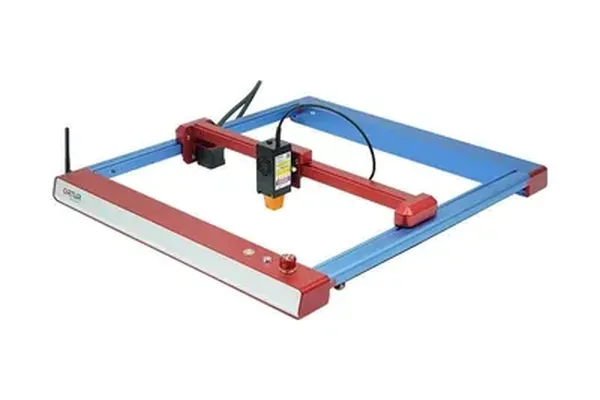
Ortur Laser Master 3
7.8/10- Flame detection, tilt sensor, smoke detector, active position protection, e-stop — full active safety suite
- 400×400mm work area covers most hobby projects
- Wi-Fi and app control built in
- LightBurn compatible
- Reasonable price for the safety feature set
- 50-minute assembly
- Good beginner-friendly entry point
- No air assist included — add-on required
- 10W optical output — half the S30 Pro Max's power
- 148 grayscale tones — good but not class-leading
- LaserGRBL is dated vs xTool Creative Space
- 400×400mm ceiling limits large-format work
- No honeycomb bed included
Engraving Quality Side by Side
On paper, 152 vs 148 grayscale tones sounds like a meaningful gap. In practice, it is the smallest differentiator in this comparison.
Both machines produce clean text at small sizes. Both handle logos and geometric fills accurately across their full work area. Both produce acceptable portrait results — not the sharpest in class, but not embarrassing either. At these grayscale counts, the quality difference between the two machines is visible side by side in demanding photographic work but not noticeable in most practical projects.
The bigger quality gap is not between these two machines — it is between both of them and the xTool D1 Pro . At 166 tones and a tighter 0.08×0.06mm laser spot, the D1 Pro produces noticeably sharper midtone gradients on portrait work. For buyers where engraving quality is the primary decision factor and budget allows, the D1 Pro is the machine to buy. The full comparison is in our xTool D1 Pro vs Ortur LM3 article .
Where the S30 Pro Max and LM3 genuinely differ on output quality is cutting throughput. The S30 Pro Max’s 20W module with built-in air assist handles 6mm birch in 2 passes. The LM3’s 10W without air assist takes 4 passes on the same material. That is double the time and more charring. For anyone who cuts material regularly — not just engraves — this performance gap is more meaningful than the 4-tone engraving quality difference.
Who Should Buy Which — The Decision Guide
Here is the honest breakdown. Not pros and cons — an actual decision.
Buy the Sculpfun S30 Pro Max if:
You need to work on pieces larger than 400mm in either dimension, right now, regularly. Signs, large cutting boards (18 inches and above), cornhole boards, full tote bags, A2-format artwork, charcuterie boards — these are the projects that make the S30 Pro Max’s 600×600mm bed the obvious choice. No other 20W open-frame laser in this price range can do them without tiling.
You cut material at 6mm or thicker on a regular basis. The 20W module with built-in air assist reduces 6mm birch from 4 passes to 2 compared to the LM3 without air assist. That throughput difference matters when you’re running production batches.
You are an experienced laser operator running attended sessions in a dedicated workshop. The absence of active safety features on the S30 Pro Max is a real constraint — but for someone who has built safe operating habits and is not leaving a machine running unattended, it is a manageable one.
You are already a LightBurn user. Buyers who bypass first-party software entirely find the S30 Pro Max’s Sculpfun Maker weakness becomes irrelevant — you’re on an equal footing in LightBurn. For a broader view of how the S30 Pro Max sits in the full market, the best laser engravers under $500 guide places it in context.
Buy the Ortur Laser Master 3 if:
You’re buying your first open-frame laser and want hardware-level safety features while you’re learning. Flame detection and tilt protection are not features you’ll think about until you need them. Having them is the difference between the machine shutting itself down and the machine becoming a problem.
Your work area is 400×400mm or smaller. Most hobby projects — coasters, tumblers, phone cases, small cutting boards, personalized gifts — fit within the LM3’s bed without issue. The S30 Pro Max’s size advantage is only relevant if you regularly exceed that limit.
Your budget is closer to $300. The LM3 saves you $50–$100 versus the S30 Pro Max and comes with a more complete safety package. For what it costs, it delivers reasonable results on the material range that most hobbyists actually work with. The best laser engraver for beginners guide covers the full entry-level decision in more detail.
You value Wi-Fi control. It is a small thing, but the OrcaMaster app’s ability to send jobs remotely is a convenience the S30 Pro Max does not offer. For buyers who hate being tethered to a USB cable or want to queue a job from another room, it is a real quality-of-life win.
Consider neither and look at the xTool D1 Pro if:
Your budget stretches to $450–$550 and you want the best overall machine in this class. The D1 Pro outscores both on engraving quality (166 tones), has flame detection and tilt sensor like the LM3 but combined with better software and air assist built in, and ships with xTool Creative Space — meaningfully better software than either Sculpfun Maker or LaserGRBL. It is the machine I’d recommend to someone who is serious about getting the most out of a diode laser without regretting the purchase six months in. See our xTool D1 Pro vs Sculpfun S30 Pro Max comparison for the full breakdown.
What About Other Options?
The Enclosed Alternative: xTool S1
Both the S30 Pro Max and the LM3 are open-frame machines. If fume containment and indoor safety are your primary concerns, neither fully solves the problem. The xTool S1 review covers the enclosed diode alternative — a machine with a built-in exhaust port, proper fume containment, and a camera alignment system. It costs more but is genuinely apartment-friendly in a way that no open-frame machine can claim. For buyers who want laser engraving capability without building out an external ventilation setup, the xTool S1 is worth serious consideration.
The Entry-Level Budget Option: Sculpfun S9
If neither machine fits your budget and you want to start smaller, the Sculpfun S9 review covers Sculpfun’s entry-level machine. It is less powerful and has a smaller work area than either machine in this comparison, but it is a legitimate starting point for buyers who want to try the craft before committing to a higher price point. The skills and software workflow you build on the S9 transfer cleanly to the S30 Pro Max if you decide to upgrade.
Understanding the Technology First
If you’re still building your understanding of diode vs CO2 vs fiber laser differences — which is a reasonable place to be before spending $300–$450 — the diode vs CO2 vs fiber laser guide covers the full technology comparison. Both machines in this article are diode lasers, which means they share a set of material limitations (no clear acrylic, no bare metal) that you should understand before buying. Spending an hour with that guide first will sharpen your decision.
Frequently Asked Questions
Is the Sculpfun S30 Pro Max better than the Ortur Laser Master 3?
What is the work area difference between the S30 Pro Max and Ortur LM3?
Does the Ortur Laser Master 3 have air assist?
Which open-frame laser is safer for home use?
Should I buy the S30 Pro Max, the Ortur LM3, or the xTool D1 Pro?
Final Verdict
You have read this far, which means you are serious about getting this decision right.
Here is how to choose.
If large-format work is your reason for buying a laser — pieces wider or taller than 400mm, large cutting boards, signs, batch setups that fill a big bed — the Sculpfun S30 Pro Max is the only open-frame 20W machine in this price range that can do it. The 600×600mm bed is not an incremental upgrade over the LM3’s 400×400mm. It is a different capability class. The S30 Pro Max rates 8.5/10 for a reason: it delivers on its primary promise cleanly, and the price-per-square-mm of work area is unmatched in 2026.
If you are buying your first laser and safety matters — or if you will ever leave the machine running while you step away, even briefly — the Ortur Laser Master 3 is the machine I’d put in front of you first. Its 7.8/10 reflects real limitations in power and work area. But flame detection and tilt protection are not features you will miss until you need them, and when you need them, you really need them. For a beginner building habits on an open-frame machine, the LM3’s hardware safety suite is worth more than the S30 Pro Max’s larger bed.
If you are still undecided and can stretch your budget, read our best laser engravers of 2026 guide and take a second look at the xTool D1 Pro. It is the machine that makes both of these comparisons easier — it scores better than either on quality, safety, and software, and the premium over the S30 Pro Max is modest enough to matter less than you’d think when you’re using it daily.
Both the S30 Pro Max and the LM3 will produce results you’d be proud of. The decision is about which trade-off you are more willing to live with.
Ready to buy?
Buy the Sculpfun S30 Pro Max →Ready to buy?
Buy the Ortur LM3 →You Might Also Like
xTool D1 Pro vs Ortur Laser Master 3: The Definitive 2026 Comparison
xTool D1 Pro vs Ortur Laser Master 3: real engraving tests, cut speeds, software, and safety compared. Which open-frame laser should you buy in 2026?
xTool D1 Pro vs Sculpfun S30 Pro Max: Which Open-Frame Laser Wins in 2026?
xTool D1 Pro vs Sculpfun S30 Pro Max: real test data, engraving quality, work area, and who should buy which. Honest 2026 comparison.
Glowforge Aura vs xTool M2: Which Is Right for Beginners?
Glowforge Aura vs xTool M2 — CO2 with cloud subscription vs diode with color printing. Honest 2026 comparison with real test data and clear buyer guidance.