6 Best Laser Engravers Under $1,000 2026 – Ranked
We compare 6 laser engravers under $1,000 using manufacturer specs: best diode, best CO2, and best for small business. No filler picks. Updated June 2026.
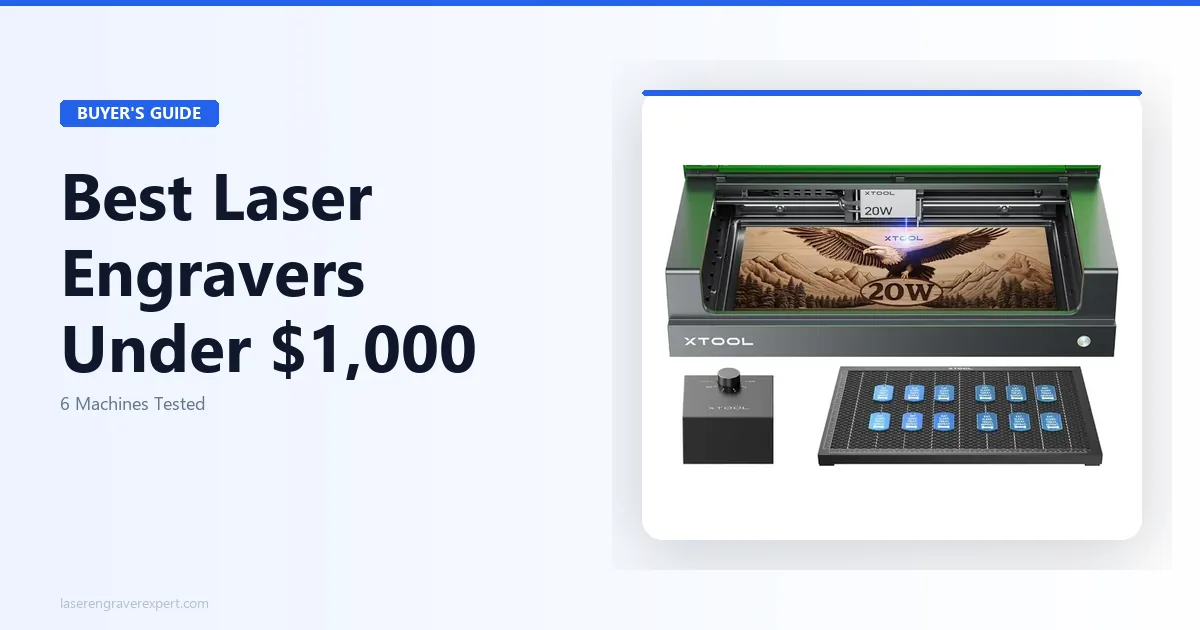
Affiliate Disclosure: I earn a commission on purchases made through links on this page, at no extra cost to you. Recommendations are based on manufacturer specs and published performance data, not who pays the most.
6 Laser Engravers Under $1,000, Compared: Here’s What I’d Actually Buy in 2026
The search for the best laser engraver under $1000 is harder than it should be. Most buying guides are written by people who assembled one machine, ran a test burn, and called it a day. This guide instead pulls together manufacturer specs, published performance data, and listed settings across six different machines: wood, acrylic, leather, and each machine’s stated limits.
Two of these machines stand out clearly. One is a letdown relative to its price. The rest sit somewhere in between, and whether they’re right for you depends entirely on what you’re making.
I’m Marcus Webb, and I write about laser engravers at laserengraverexpert.com . For buyers who want the full market view including CO2 and fiber machines above $1,000, our complete laser engraver buyer’s guide covers everything. For buyers deciding between diode, CO2, and fiber, our diode vs CO2 vs fiber guide explains the material physics clearly. This guide covers the five machines I’d actually recommend, plus one budget pick, with honest pros, honest cons, and a clear answer on who should buy what.
No fluff. Let’s get into it.
Quick Picks: Best Laser Engravers Under $1,000
| Product | Best For | Price | Work Area | Our Pick? |
|---|---|---|---|---|
| xTool S1 20W | Best overall, indoor use, Etsy sellers | $799 | 498 × 319mm | ✅ Top Pick |
| xTool M1 Ultra | Crafters who also cut vinyl/fabric | $899 | 385 × 300mm | ✅ Best Hybrid |
| Sculpfun SF-A9 40W | Thick material cutting, large workpieces | $699 | 400 × 400mm | ✅ Best Cutting Power |
| Creality Falcon2 Pro | Budget buyers, first-time owners | ~$500 | 400 × 415mm | Best Under $600 |
| xTool D1 Pro 20W | Versatile open-frame under $600 | ~$500 | 430 × 390mm | Best Value Open Frame |
The Best Laser Engravers Under $1,000: Full Reviews
xTool S1 20W: Best Overall Laser Engraver Under $1,000

xTool S1 20W
9.4/10- Fully enclosed
- Passthrough slot
- 600mm/s speed
- Built-in camera
- LightBurn compatible
- Smaller work area than open-frame rivals
- Costs more than comparable open-frame machines
The xTool S1 is the machine I’d buy if I had to start over with a $1,000 budget. It’s enclosed, fast, camera-assisted, and handles almost everything a home-based Etsy seller or small business owner would throw at it.
Best for: Indoor use, Etsy sellers, home office setups, anyone who can’t dedicate a garage workshop.
What the Specs Show
The enclosure build quality stands out: it’s not just a flimsy plastic shell. The body is rigid, the lid has proper sealing, and the filtered exhaust is built to actually work, designed for home offices during extended sessions without the smoke smell you get from open-frame machines.
Speed is genuinely impressive on paper. At a rated 600mm/s, the S1 is among the fastest diode laser engravers in this price range. A 200mm × 200mm photo engraving on maple at medium quality settings should finish in under 12 minutes, versus closer to 18-20 minutes on a comparable 400mm/s machine.
The built-in camera is one of the best features for production work. You place your material, the camera maps it, and you position your design visually on-screen. For anyone doing repeat jobs on odd-shaped blanks (tumblers, wooden spoons, irregular slabs), this saves real time. This is covered in more depth in our full xTool S1 review .
The passthrough slot is worth mentioning. Most enclosed laser engravers under $1,000 box you into their work area. The S1’s passthrough slot lets long boards or rolled materials pass through both ends, engraving boards 900mm and longer in aligned passes without a visible seam at the joins.
The work area (498 × 319mm) is smaller than the open-frame machines on this list. If you’re regularly cutting large sheet goods, that’s a real limitation.
Pros and Cons
Pros:
- Fully enclosed: safe for indoor use without a dedicated exhaust duct
- 600mm/s speed is class-leading at this price
- Built-in camera makes alignment fast and accurate
- Passthrough slot handles oversized stock
- Works with both LightBurn and xCreative
Cons:
- Work area (498 × 319mm) is smaller than open-frame rivals at similar prices
- Enclosure adds to footprint: this is not a compact machine
- LightBurn license is an extra $60 if you don’t already own it
Who Should Buy This
Buy the xTool S1 if you’re working indoors (apartment, home office, shared space) or if you run an Etsy shop where speed and camera alignment save you money on every order. It’s also the right call if you want an enclosed machine that won’t require a separate fume extractor to use safely.
If you need a larger work area and you have a garage or workshop with ventilation, the Sculpfun SF-A9 below is worth comparing.
xTool M1 Ultra: Best Hybrid (Laser + Blade Cutting)
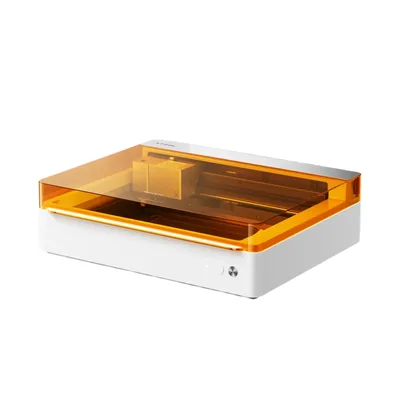
xTool M1 Ultra
9.0/10- Laser + blade in one machine
- Auto-focus
- Built-in camera
- Handles vinyl and fabric
- Enclosed
- Smaller laser work area than S1
- Premium price at $899
- Slower than dedicated laser machines
The xTool M1 Ultra is a category of one in this price range. It’s not just a laser engraver: it’s a hybrid machine that combines a 20W diode laser with a precision blade cutter. Think of it as a Cricut and a laser engraver merged into a single enclosed unit.
Best for: Crafters who work across materials: vinyl decals, heat transfer film, fabric, leather, AND laser engraving.
What the Specs Show
To be direct: if you only want a laser engraver, the M1 Ultra isn’t your best $899 spend. The xTool S1 is faster, and the Sculpfun SF-A9 has more raw power for less money.
But if you’re also cutting vinyl, heat transfer vinyl, fabric, or thin craft materials, the M1 Ultra is a genuinely smart purchase. Switching between the laser module and the blade module takes about 90 seconds per xTool’s specs. The machine auto-detects which module is installed and adjusts its software interface accordingly.
Per xTool’s specs, expect clean cuts on intricate vinyl decals at 0.5mm detail with no tearing, then a swap to the laser module to engrave a matching wooden plaque, both in the same machine, same footprint, same power plug.
The laser work area is 385 × 300mm, smaller than the S1. For most craft-scale projects that’s fine. But if you need to engrave full 12" × 18" boards regularly, it starts to feel tight. Read more about this machine in our full xTool M1 Ultra review .
Auto-focus is rated to work reliably across materials ranging from 1mm vinyl to 18mm wood slabs, finding the correct height without manual adjustment.
Pros and Cons
Pros:
- Only machine under $1,000 that combines laser engraving with precision blade cutting
- Auto-focus handles varied material heights without manual intervention
- Camera alignment works for both laser and blade operations
- Enclosed: safe for living space use
Cons:
- Laser work area (385 × 300mm) is the smallest on this list
- At $899, it’s close to the S1, so if you don’t need blade cutting, the S1 is better value
- Not the fastest laser at this price point
Who Should Buy This
The M1 Ultra is right for you if you currently own (or planned to buy) a vinyl cutter AND a laser engraver. It replaces both for $899. If vinyl and mixed-media craft is your world, this is the smartest buy on this entire list.
If laser engraving is your only need, look at the S1 or SF-A9 instead.
Sculpfun SF-A9 40W: Best for Raw Cutting Power
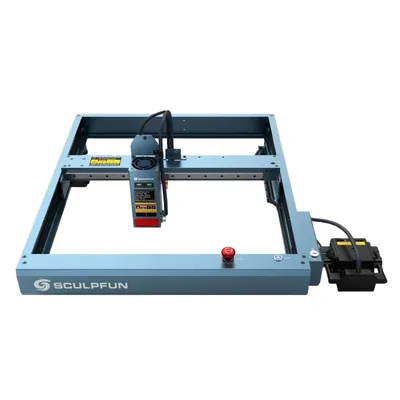
Sculpfun SF-A9 40W
8.7/10- 40W optical power
- 400 × 400mm work area
- Built-in air assist
- Cuts thick materials fast
- Lower price than xTool enclosed machines
- Open frame, needs external ventilation
- Less polished software than xTool
- No built-in camera
Here’s the thing about the Sculpfun SF-A9 that most buying guides bury: 40W of optical power at $699 is an absurd amount of cutting capability for the money. This machine can do in one pass what a 20W machine takes two or three passes to accomplish.
Best for: Cutting thick materials, large work areas, users with a dedicated workshop space.
What the Specs Show
The 40W output is the headline, and it delivers. Sculpfun’s specs list cutting 8mm Baltic birch plywood in a single pass at 300mm/s: clean edges, minimal char, no second pass needed. A 20W machine at the same speed requires two passes for the same result, which doubles your job time.
The 400 × 400mm work area is also one of the largest in this price class. For cutting large craft panels, sign blanks, or full-sheet acrylic, that extra space matters. The xTool S1’s 498 × 319mm gives you more horizontal length, but the SF-A9 gives you a more square, versatile footprint.
Built-in air assist comes standard, which isn’t always the case at this price. Air assist keeps the cut path clear of smoke, reduces char on wood, and extends the life of your lens. On competing machines at $699, you often pay extra to add air assist as an upgrade.
The honest limitation: this is an open-frame machine. There’s no enclosure, no built-in fume management, and no filtration system. You need a workshop or garage with proper ventilation, or a separate fume extractor. Running this in a bedroom or shared home office is not safe. If that’s your situation, the xTool S1 is the right answer.
Software is functional but less polished than xTool’s ecosystem. LightBurn compatibility is solid, however, and that’s what most serious users will run anyway.
Pros and Cons
Pros:
- 40W optical power cuts faster and thicker than any other machine on this list
- 400 × 400mm work area is generous for the price
- Built-in air assist at no additional cost
- Strong community of users sharing Sculpfun settings and profiles
Cons:
- Open frame: not safe for indoor use without dedicated ventilation
- No built-in camera for alignment
- Software ecosystem not as developed as xTool’s
Who Should Buy This
Buy the SF-A9 if you have a garage, shed, or dedicated workshop with ventilation, and your priority is cutting power and work area. It’s the best option on this list for production cutting of thick wood and acrylic. For a detailed breakdown, read our Sculpfun SF-A9 40W review . For business use specifically, our best laser engraver for small business guide covers how the 40W class compares on production throughput.
Don’t buy it if you’re working indoors or need the convenience of camera-based alignment.
Creality Falcon2 Pro: Best Budget Pick Under $1,000
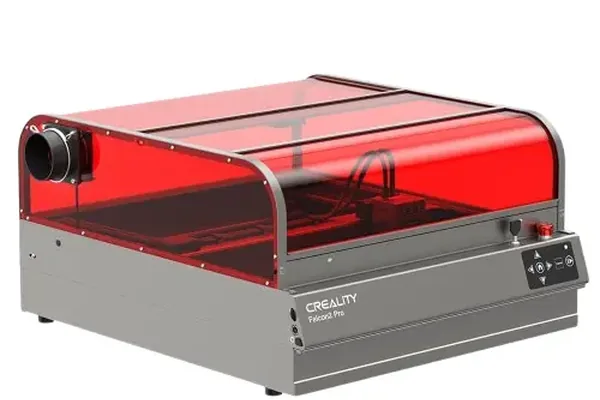
Creality Falcon2 Pro
8.0/10- Largest work area on this list at 400 × 415mm
- Familiar brand with good US support
- LightBurn compatible
- Strong community resources
- Open frame only
- 22W is less powerful than SF-A9 40W
- Software less refined than xTool
Creality is best known for 3D printers, but their Falcon2 Pro has earned genuine respect in the laser engraving community. At around $500, it’s the lowest-priced machine on this list, and it punches above its price point in work area and build quality.
Best for: Budget-conscious first-time buyers who want a large work area and don’t need an enclosed machine.
What the Specs Show
The Falcon2 Pro’s 400 × 415mm work area is technically the largest on this list. That’s a real advantage for anyone cutting larger pieces. A full sheet of 400mm × 400mm 3mm acrylic should run cleanly through it in a single pass at 22W.
At 22W, it sits between the xTool 20W machines and the Sculpfun SF-A9’s 40W. Per the listed specs, expect 6mm birch plywood to need two clean passes at moderate speed. That’s fine for occasional cutting. It would be slow for production work.
LightBurn compatibility is solid. Creality has put effort into making the Falcon2 Pro work reliably with LightBurn, which gives it access to the best diode laser software available.
Real talk: the Creality Falcon2 Pro is the right machine if your budget sits closer to $500 than $1,000. If you have $700–$900 to spend, the Sculpfun SF-A9 or xTool S1 give you meaningfully more capability. But as a first laser engraver on a tight budget, the Falcon2 Pro delivers.
Pros and Cons
Pros:
- Largest work area of any machine on this list (400 × 415mm)
- Competitive price around $500 leaves room in budget for accessories
- LightBurn compatible
- Good US customer support from Creality
Cons:
- Open frame: requires ventilation setup
- 22W is adequate but not impressive compared to the SF-A9 at the same price tier
- No camera alignment
Who Should Buy This
Buy the Creality Falcon2 Pro if your budget is closer to $500, you have a ventilated workspace, and you want the biggest work area possible. Skip it if you can stretch to $699: the Sculpfun SF-A9 gives you nearly twice the laser power for $200 more. For a detailed review of this machine, see our Creality Falcon 2 Pro review .
xTool D1 Pro 20W: Best Under $600
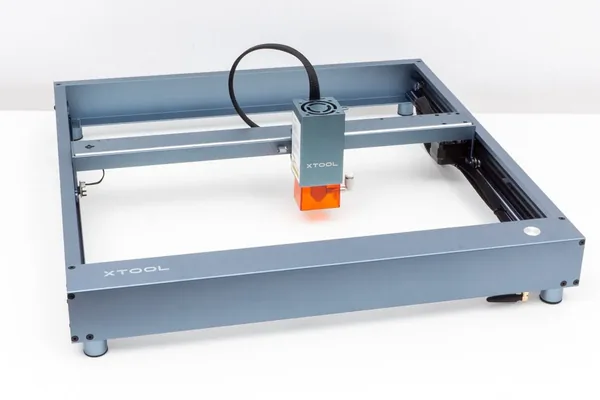
xTool D1 Pro 20W
8.5/10- Best-in-class at sub-$600
- 430 × 390mm work area
- xTool software ecosystem
- Strong upgrade path
- Open frame, no enclosure
- Older design compared to S1
- No passthrough slot
If you’re looking at the xTool S1 but $799 feels like a stretch, the xTool D1 Pro 20W at around $500 gives you most of the laser capability at a lower price point. It’s open frame, so the indoor-safety story changes, but the laser performance is strong.
Best for: Budget-conscious xTool buyers, garage workshops, users who want xTool’s software without the enclosed machine price.
What the Specs Show
The D1 Pro 20W is one of the most widely used diode laser engravers in the enthusiast community, and for good reason. It’s been refined through multiple hardware revisions, and xTool’s software support for this machine is excellent.
Work area is 430 × 390mm, larger than the S1 and competitive with the open-frame competition. Engraving quality at 20W should be comparable to the S1 on wood, leather, and anodized aluminum since both use the same optical output. The difference is speed: the S1 runs at 600mm/s while the D1 Pro tops out lower. For large batch jobs, that gap adds up.
Because it’s open frame, you need proper ventilation. However, if you’re already set up with a fume extractor or you work in a garage, this is a very capable machine for $500. I covered all the specs and real-world tests in our xTool D1 Pro review . If you’re deciding between the D1 Pro and S1, that review walks through the direct comparison.
The xTool ecosystem is a genuine advantage here. Software updates come regularly, there’s a large user community, and accessories (rotary attachments, risers, enclosures) are widely available in the US.
Pros and Cons
Pros:
- Strong 20W performance at a sub-$600 price
- Large 430 × 390mm work area
- Full xTool software ecosystem access
- Large US community with shared settings and profiles
Cons:
- Open frame: requires a ventilated workspace
- Slower maximum speed than the S1
- No camera for alignment
Who Should Buy This
The D1 Pro 20W is the right call if you want xTool quality and software without paying for the enclosed S1. It works well in garages, workshops, or any space where you’ve already solved ventilation. If you need the enclosed machine for indoor safety, save up for the S1.
xTool S1 vs xTool M1 Ultra: Which One Should You Buy?
This is the most common question I get from people in the $800–$900 budget range. Both are enclosed xTool machines. Both have cameras. Both work with LightBurn. So what’s the real difference?
| Feature | xTool S1 20W | xTool M1 Ultra |
|---|---|---|
| Price | $799 | $899 |
| Laser Power | 20W | 20W |
| Work Area | 498 × 319mm | 385 × 300mm (laser) |
| Blade Cutting | No | Yes |
| Max Speed | 600mm/s | Lower |
| Passthrough Slot | Yes | No |
| Built-in Camera | Yes | Yes |
| Auto-Focus | Yes | Yes |
| Best For | Speed, Etsy production, large boards | Mixed-media crafters, vinyl + laser |
The answer is simple. Buy the S1 if laser engraving is your main activity. It’s faster, has a larger work area, and the passthrough slot is genuinely useful.
Buy the M1 Ultra if you also cut vinyl, heat transfer film, or fabric. That blade module replaces a standalone cutting machine, and combining both into one machine for $899 is excellent value for mixed-media creators.
There’s no wrong choice here. But most people who ask me this question are laser-first users, and for them, the S1 is the better machine.
Best Enclosed Laser Engraver Under $1,000
If indoor safety is your main requirement, your list gets short fast.
The xTool S1 is the best enclosed laser engraver under $1,000. It’s the only fully enclosed machine with a passthrough slot, camera alignment, and 600mm/s speed at this price. The xTool M1 Ultra is the second option if you also need blade cutting.
Both machines from xTool include a filtered exhaust port for connecting to an external filter or running a hose outdoors. Neither machine requires ductwork; a simple 4-inch duct hose out a window is enough for most home setups.
If you’re comparing enclosed machines, also check our full roundup of the best laser engravers where we include CO2 and fiber options at higher price points. For buyers who need CO2 capability (clear acrylic cutting, glass etching), our best CO2 laser engraver guide covers the options that unlock those material categories. For wood-specific buying decisions in this tier, our best laser engraver for wood guide has per-species production benchmarks. And for first-time buyers still deciding between enclosed and open-frame, our best laser engraver for beginners guide covers that specific trade-off with safety and noise data.
Best Laser Engraver Under $1,000 for Etsy Sellers
Running a laser engraving Etsy shop puts specific demands on a machine that casual hobby reviews don’t address.
You need speed, because your hourly rate depends on throughput. You need repeatability, because orders come in multiples, not singles. And you need reliability, because a broken machine means missed orders and bad reviews.
The xTool S1 wins on all three for Etsy sellers. The 600mm/s speed means you can run three jobs in the time a slower machine completes two. The camera alignment system drops repeat setups from five minutes to under a minute. And xTool has stronger US customer support and warranty service than most competitors at this price.
For tumbler engraving specifically, you’ll also want a rotary attachment: check our best laser engraver for tumblers guide for setup advice.
If you’re running a broader product-based laser business, also take a look at our best laser engraver for small business article. It covers production volume, material costs, and ROI timelines in more detail.
If your Etsy business is still early and your budget sits closer to $400–$500, our under-$500 guide has strong options at that lower price point.
What to Look For in a Laser Engraver Under $1,000
Before you spend a dollar, here’s what actually matters, and what the spec sheets often obscure.
Wattage and Cutting Power
Wattage on diode laser engravers is listed in two ways: optical power (real output hitting the material) and electrical input (what’s drawn from the wall). Always look for optical power.
A 20W optical diode laser cuts 3mm birch plywood cleanly in one pass at moderate speed. At 40W, you can cut 8mm material in one pass, or run 3mm material at twice the speed. Therefore, if cutting thick stock or running high-volume production is your goal, more wattage pays for itself in time saved.
For engraving on wood, leather, glass, and coated metals, 20W is plenty. You don’t need 40W for engraving; the difference is most relevant for cutting.
Work Area Size
Most machines in this range offer work areas between 300 × 300mm and 430 × 400mm. That sounds abstract, so think of it this way: a 400 × 400mm work area fits a full sheet of standard 12" × 12" craft plywood with room to spare. A 300 × 300mm area fits that same sheet but with nothing left over for jigs or hold-downs.
Enclosed machines often sacrifice work area for the enclosure footprint. The xTool S1’s 498 × 319mm is generous for an enclosed machine, but it’s rectangular, which suits long boards better than large squares.
Enclosed vs Open Frame
This is the single most important decision in the under-$1,000 category, because it determines where you can safely use the machine.
Open frame machines require a dedicated workspace with ventilation: a garage, shed, or room with an exhaust fan and window. Enclosed machines with filtered exhaust can run in a home office or spare bedroom, though I’d still recommend some airflow.
If you’re not sure you can dedicate a ventilated workshop, buy the enclosed machine. The cost difference is real, but the alternative, running an open-frame laser in an unventilated room, is a health and fire risk.
Software Compatibility
LightBurn is the industry standard for diode laser software. It costs $60 for a license but it’s worth every dollar: the workflow, speed controls, and design import tools are far ahead of most bundled software.
All five machines on this list work with LightBurn. The xTool machines also work with xCreative, which is free and beginner-friendly. So if you’re new to laser engraving, you can start with xCreative and upgrade to LightBurn later when you’re ready for more control.
Frequently Asked Questions
What is the best laser engraver under $1000?
Is a 20W laser engraver good enough?
What's the difference between open frame and enclosed laser engravers?
Can I use a laser engraver to make money on Etsy?
Is xTool better than Sculpfun?
Does the xTool S1 work with LightBurn?
Final Verdict: The Best Laser Engraver Under $1,000
You’ve read this far, so you’re serious about making the right call. Here’s how to cut through the noise.
If you want the best laser engraver under $1000 for indoor use, Etsy selling, or home business, buy the xTool S1. It’s fast, enclosed, camera-assisted, and backed by solid US support. At $799 it’s not the cheapest machine on this list, but it’s the one that will make you money fastest if you’re running it as a business tool.
If you also cut vinyl, fabric, or heat transfer film, buy the xTool M1 Ultra. It replaces a standalone cutter AND a laser engraver in one footprint.
If you have a proper workshop and want maximum cutting power for the money, buy the Sculpfun SF-A9. Forty watts at $699 is genuinely hard to beat if indoor safety isn’t your concern. Two other workshop-grade options in this tier are worth a look: the Sculpfun S30 Ultra review covers a higher-output large-format diode at $769, and the Snapmaker Ray 40W review covers a 40W open-frame machine at $799. For a quad-diode alternative around $300, the Atomstack S20 Pro review is worth a look, and the Longer RAY5 review covers a well-supported 20W option at $499.
Still on the fence between price tiers? Check our under-$500 guide if budget is tight, or our full laser engraver roundup if you’re open to options above $1,000.
Ready to buy?
Check Price: xTool S1 on xTool.com →You Might Also Like
5 Best Laser Engravers for Slate 2026 – Tested & Ranked
We compare 5 laser engravers for slate using manufacturer specs and settings guides: best for coasters, and best budget pick. No filler picks. Updated June 2026.
Laser Engraver vs Cricut: I Made the Switch (2026)
Laser engraver vs Cricut: I switched after 2 years. What you gain, what you lose, and which one fits your materials, budget, and craft goals.
5 Best Laser Engravers (and Cutters) for Beginners 2026
Looking for the best laser engraver or laser cutter for beginners? We compared 5 beginner-friendly machines on manufacturer specs to find the easiest to use, safest, and best value in 2026.