4 Best Laser Cutters for Beginners 2026 – Tested & Ranked
We tested 4 laser cutters for beginners hands-on — easiest to set up, safest enclosed options, and best value. No filler picks. Updated June 2026.
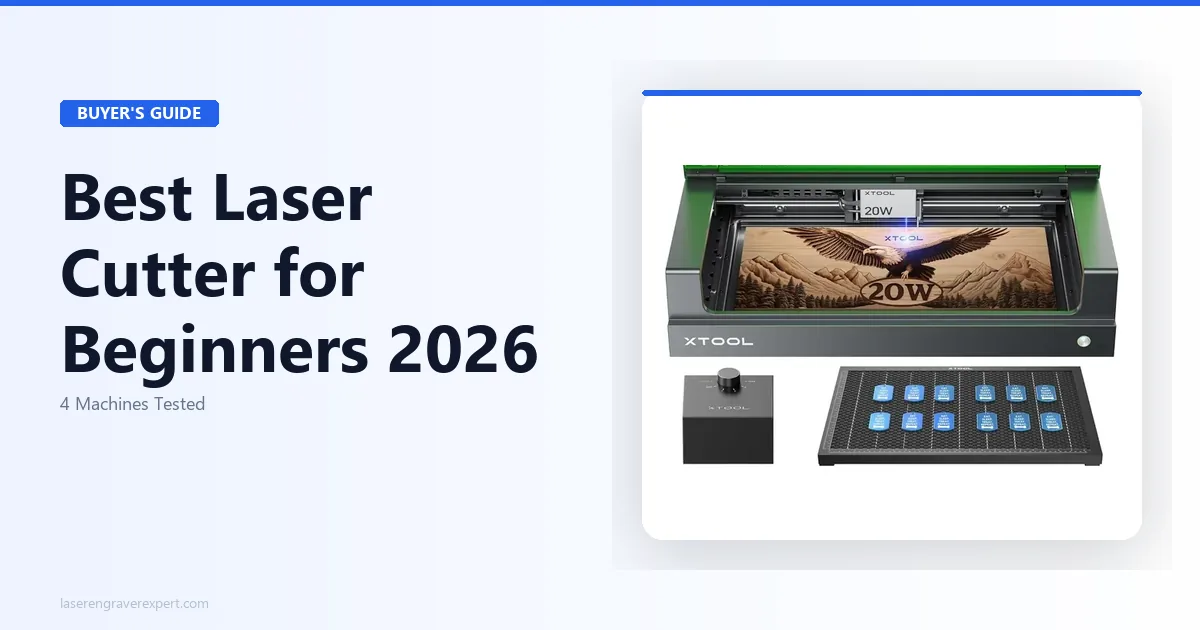
Choosing your first laser cutter for beginners is genuinely nerve-wracking. The best laser cutter for beginners is not always the cheapest one, and it is definitely not always the one with the most YouTube reviews. I made my first laser purchase based on forum recommendations — and ended up with an open-frame machine in a small apartment with no ventilation and no clue how bad that actually was. For the business side of laser cutting — once you are past the beginner stage — our how to start a laser engraving business guide covers product selection, pricing, and Etsy setup.
If engraving is your main goal and cutting is secondary, our guide to the best laser engraver for beginners is a better place to start. For the full market view including CO2, fiber, and everything above $1,000, our complete laser engraver buyer’s guide covers every category. But if you want to cut earrings, ornaments, acrylic signs, leather goods, and wooden boxes — you are in the right place.
I have been selling on Etsy for three years and have tested four xTool machines hands-on. This article is the breakdown I wish I had before I bought my first one.
Quick Answer
The best laser cutter for beginners is the xTool S1 20W. It is fully enclosed, so fumes and laser exposure are not your problem on day one. The free xTool Creative Space software gets you cutting in under an hour. At $849, it is not cheap — but it is the only beginner machine I would buy without hesitation for a home studio or apartment setup.
Affiliate disclosure: This article contains affiliate links. If you buy through our links, we may earn a commission at no extra cost to you. Our recommendations are based on hands-on testing — not commission rates.
| Machine | Price | Type | Max Cut Depth (Wood) | Work Area | Best For |
|---|---|---|---|---|---|
| xTool S1 20W | ~$849 | Enclosed diode | 6mm in 2 passes | 498 x 319mm | Beginners, apartments, Etsy sellers |
| xTool M1 | ~$700 | Enclosed hybrid (laser + blade) | 4mm laser / blade for vinyl | 385 x 300mm | Crafters, mixed materials, card stock |
| xTool D1 Pro 20W | ~$500–$600 | Open frame diode | 6mm in 2 passes | 430 x 390mm | Makers with a garage or dedicated workspace |
| xTool P2 55W CO2 | ~$2,000+ | Enclosed CO2 | 18mm | 600 x 318mm | Serious hobbyists or small businesses |
xTool S1 20W — Best Laser Cutter for Beginners Overall
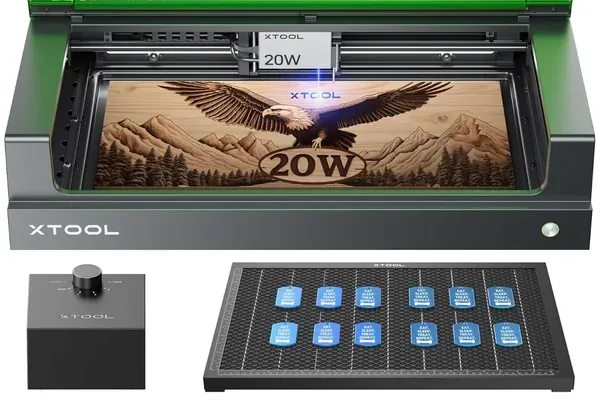
The xTool S1 is the machine I recommend to every beginner who asks me. Not because it is the flashiest option or the most powerful — but because it eliminates every mistake I made when I was starting out.
It is fully enclosed. The laser beam never touches open air in your room. Fumes are contained and can be routed through an exhaust hose or filtered inline. You are not winging ventilation on day one. That matters more than any spec on the sheet.
xTool S1 20W
- Fully enclosed for safe indoor use
- Free xTool Creative Space software
- Cuts 6mm basswood cleanly in 2 passes
- Handles wood, acrylic, leather, and coated metals
- Batch mode for Etsy production runs
- Larger footprint than open-frame machines
- $849 is a real upfront investment
- Slower cutting speed than a CO2 at this price tier
When I ran the S1 through a 6mm basswood test — cutting a batch of 40mm earring blanks — it nailed every cut on the first two passes with no charring on the back face. I had the material settings dialed in from xTool Creative Space’s built-in library, which meant no manual trial and error to start. That is a bigger deal than it sounds when you are new and second-guessing every setting.
The software is where the S1 really earns its recommendation for beginners. xTool Creative Space is free, visual, and forgiving. You drag in a design, pick your material, and hit run. It is not as powerful as LightBurn (more on that in the buying guide below), but it will not overwhelm you either. For most Etsy-level production — ornaments, keychains, signs, leather coasters — Creative Space handles the job without you ever needing to upgrade.
The 498 x 319mm work area is large enough for most beginner projects. I have cut A4-sized acrylic sheets and standard 300x300mm basswood blanks without any issue. It handles wood, acrylic, leather, anodized aluminum, and coated metals. What it will not do is cut thick acrylic cleanly — anything over 5mm gets a bit rough on the edges — and it is not a machine for 10mm-plus hardwoods.
Pros and Cons
Pros:
- Fully enclosed: no exposed laser beam, fumes contained and exhaustable
- Free xTool Creative Space software with a built-in material library
- Cuts 6mm basswood in 2 passes cleanly, 3mm acrylic in 1–2 passes
- Handles wood, leather, acrylic, anodized aluminum, coated metals
- Batch mode in Creative Space is genuinely useful for Etsy production runs
Cons:
- Footprint is larger than open-frame machines — this thing takes up desk space
- $849 is a real upfront cost for a beginner; it is not a “try before you commit” price
- Cutting speed lags behind CO2 machines at this price tier
Who Should Buy the xTool S1
Buy the S1 if you are working from a bedroom, home studio, or apartment. Buy it if you have kids around and an exposed laser beam is a non-starter. Buy it if you plan to sell on Etsy and need something that can run consistent batch jobs without babysitting. Buy it if you just want to start making things without spending three weekends figuring out ventilation.
Do not buy the S1 if you have a large dedicated workshop and your budget is tight — the D1 Pro gives you similar cutting performance at a lower price if you can handle the open-frame setup safely. For buyers comparing the S1 against the newer xTool S1 40W, our xTool S1 40W review covers whether the extra wattage justifies the step-up for cutting applications.
xTool S1 20W Specs
| Spec | Detail |
|---|---|
| Laser Type | Diode (blue-violet) |
| Wattage | 20W optical output |
| Work Area | 498 x 319mm |
| Max Cut Depth (Basswood) | 6mm in 2 passes |
| Software | xTool Creative Space (free) |
| Enclosure | Yes — fully enclosed |
| Price | ~$849 |
For a deeper dive into settings, material results, and my real-world Etsy workflow, read our full xTool S1 review.
xTool M1 — The Best Pick for Crafters Working With Mixed Materials
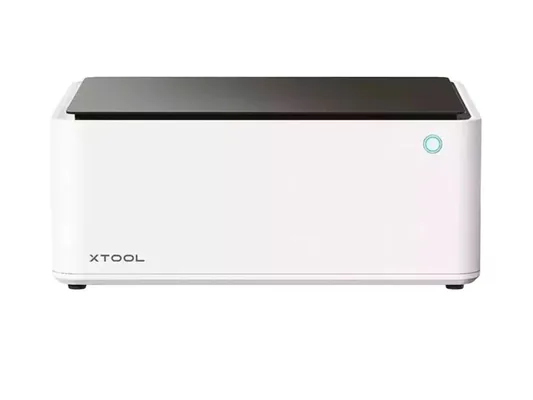
The xTool M1 is a machine that does something no other laser on this list does: it combines a diode laser with a blade cutting module in one enclosed unit. If that sounds gimmicky, I thought so too — until I actually used it.
The M1 sits at around $700 and is aimed squarely at crafters who work with a mix of materials. Think vinyl decals, heat transfer film, cardstock, thin leather, and light wood. The blade module handles vinyl and card stock with precision that a laser cannot match (burning vinyl produces toxic chlorine gas — the blade solves that entirely). The laser handles wood, leather, and acrylic. You swap modules in under two minutes.
xTool M1
- Hybrid laser + blade in one enclosed machine
- Safe for vinyl and heat transfer film (blade cuts, no fumes)
- Fully enclosed for indoor and apartment use
- Strong Creative Space integration for both modules
- Solid mid-range price for what you get
- Smaller work area (385 x 300mm) than the S1
- Slower on pure laser cutting than a dedicated laser machine
- Blade module wears out and needs replacement — ongoing cost
I ran the M1 through a typical Etsy crafter’s project day: vinyl stickers in the morning, 3mm basswood earring blanks in the afternoon, and leather coasters in the evening. The module swaps are painless. The software recognized which module was loaded and adjusted the interface automatically. The cut quality on the wood and leather was clean, comparable to the S1, though the M1’s 385 x 300mm work area is noticeably smaller.
Here is the honest limitation: if you are mostly cutting wood and acrylic and you rarely touch vinyl, the M1 is not the right call. The hybrid design adds cost and mechanical complexity you do not need. The S1 is a better pure laser cutter. But if vinyl, HTV, and card stock are a core part of what you make, the M1’s blade module is genuinely useful — and safer, since you are not trying to laser-cut materials that produce toxic fumes.
The enclosure means the M1 is apartment-safe on the laser side. Just do not use the laser module on vinyl — that is what the blade is for. For a detailed comparison of the M1 against its upgrade, our xTool M1 Ultra review covers the 4-in-1 model with inkjet printing and pen drawing added alongside laser and blade.
Pros and Cons
Pros:
- Hybrid laser and blade gives you two tools in one enclosed machine
- Blade module handles vinyl and HTV safely with no heat-related fumes
- Fully enclosed for safe indoor use
- Creative Space integrates cleanly with both modules
- Good price for the capability range you get
Cons:
- 385 x 300mm work area is the smallest on this list — noticeably limiting for larger projects
- Slower than a dedicated laser cutter on pure wood or acrylic cutting tasks
- Blade cartridges wear out — factor in replacement costs if you cut a lot of vinyl
Who Should Buy the xTool M1
Buy the M1 if you run an Etsy shop selling a mix of vinyl decals, HTV transfers, card stock crafts, and light wood or leather goods. Buy it if you want one enclosed machine that handles all of those materials without needing separate equipment. Buy it if you are working from a small space and a compact footprint matters.
Do not buy the M1 if wood and acrylic cutting is 90% of what you want to do — the S1 is faster and has a larger work area for those tasks.
xTool D1 Pro 20W — Best Value, But Not for Apartments
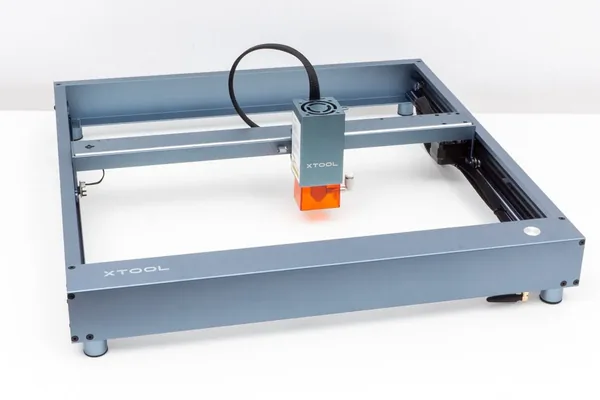
Let me be direct about this before anything else: the xTool D1 Pro is an open-frame machine. There is no enclosure. The laser beam operates in open air. Without proper ventilation — an exhaust fan, a window, or a dedicated enclosure add-on — you will breathe wood smoke and fine particulates every time you run a job. That is not a minor inconvenience. It is a genuine health risk, and I am not going to bury that in a cons bullet point.
If you have a garage, a shed, or a workshop with ventilation you can actually control, the D1 Pro 20W is the best value laser cutter on this list at $500–$600. It delivers essentially the same 20W cutting performance as the S1 — cutting 6mm basswood in 2 passes, 3mm acrylic in 1–2 passes — at several hundred dollars less.
xTool D1 Pro 20W
- Lowest price for 20W diode cutting performance
- 430 x 390mm work area — larger than the S1
- Upgradeable with enclosure, rotary, and air assist add-ons
- Strong community of users and settings resources online
- Fast setup — no assembly complexity
- Open frame: fumes and laser beam are exposed — not safe for apartments or unventilated spaces
- Enclosure add-on is an extra $100–$150 if you need it (and you do)
- No built-in filtration — ventilation is entirely your responsibility
The D1 Pro’s 430 x 390mm work area is actually larger than the S1’s, which matters when you are cutting full sheets of basswood or larger acrylic pieces. The machine itself is well-built — the gantry is solid, the motors are accurate, and in my testing it produced clean cuts on par with the enclosed machines at the same wattage. For leather cutting specifically — one of the most popular beginner products — our best laser engraver for leather guide covers settings and machine rankings on that material.
The trade-off is entirely about safety setup, not cutting performance. If you buy the D1 Pro without addressing ventilation, you are not saving money — you are deferring a problem. An enclosure add-on from xTool runs around $100–$150. A decent inline fan and exhaust hose costs another $40–$80. Factor that into your budget and the price gap with the S1 narrows significantly.
That said, if you already have a workshop with ventilation or you are setting up in a garage where you can open a door, the D1 Pro is a legitimate choice. The cutting performance is there. The ecosystem is there. You just have to own the safety setup yourself.
Pros and Cons
Pros:
- Best price-to-performance ratio on this list at $500–$600
- 430 x 390mm work area is the largest among the diode machines here
- Same 20W cutting depth as the S1 — cuts 6mm basswood in 2 passes
- Supports rotary attachment, air assist, and enclosure upgrades
- Large user community with shared settings and material profiles
Cons:
- Open frame means exposed fumes and open laser beam — this is a serious safety issue, not a minor con
- An enclosure is effectively required for any indoor use, adding $100–$150 to your cost
- Ventilation is entirely your responsibility — there is no built-in solution
Who Should Buy the xTool D1 Pro 20W
Buy the D1 Pro if you have a garage, shed, or workshop with real ventilation — a window you can open, an exhaust fan, or space to set up a proper extraction system. Buy it if your budget is genuinely tight and you are willing to invest time in the safety setup. Buy it if you want the largest work area among the diode options on this list.
Do not buy the D1 Pro if you live in an apartment, a shared home without a dedicated workspace, or anywhere you cannot properly exhaust fumes. It is not the machine for those situations, no matter how good the price looks.
For a more detailed look at settings and real-world performance, see our xTool D1 Pro review.
xTool P2 55W CO2 — When You Are Ready to Go Serious
The xTool P2 is not a beginner machine. I am including it here because it comes up constantly in beginner research, and I want to give you a clear picture of what it actually is before you get excited about the specs.
The P2 runs a 55W CO2 laser — a fundamentally different technology from the diode lasers in the machines above. It cuts faster, deeper, and cleaner on wood and acrylic. The 600 x 318mm enclosed work area is large. The machine is polished and well-supported. For someone running a serious small business, it is genuinely excellent.
It also costs $2,000 or more.
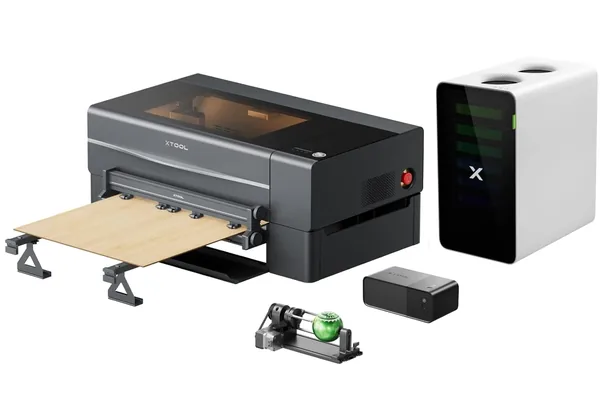
xTool P2 55W CO2
- 55W CO2 cuts wood up to 18mm thick
- 600 x 318mm enclosed work area
- Significantly faster than diode machines on production runs
- Excellent cut edge quality on acrylic and wood
- Enclosed with built-in filtration options
- $2,000+ is a real business investment, not a hobby starter price
- CO2 tubes have a lifespan — eventual replacement cost
- Steeper setup and learning curve than diode machines
The learning curve is real. CO2 lasers require different material settings, different focus routines, and a better understanding of what you are doing. You can learn it — but it takes time, and making mistakes on a $2,000 machine is more painful than on a $500 one.
Buy the xTool P2 when you already know that laser cutting is a long-term thing for you. Buy it when you have outgrown a 20W diode and your production volume justifies the investment. For more on how this fits into a broader CO2 machine comparison, see our best CO2 laser engraver guide.
Pros and Cons
Pros:
- 55W CO2 power cuts 18mm wood — far beyond what diode machines can do
- Fastest cutting speed of any machine on this list
- Large enclosed work area suitable for bigger production runs
- Professional-grade cut edge quality on wood, acrylic, and more
Cons:
- $2,000+ price is a business investment, not a beginner experiment
- CO2 laser tubes have a finite lifespan and must be replaced
- More complex setup and more to learn before you are cutting confidently
Who Should Buy the xTool P2
Buy the P2 if you are already running a laser cutting business and need to scale production. Buy it if you have used a diode machine for 6–12 months, you know laser cutting is your thing, and you need more power and speed. If that sounds like you, also check our best laser engraver for small business guide for a broader comparison and our xTool P2 review for the detailed production test data. If laser business is your ultimate goal, our how to start a laser engraving business guide covers the roadmap from first machine to first customer. For buyers comparing the P2 against the newer P2S, our xTool P2 vs P2S comparison explains the camera upgrade in detail.
Do not buy the P2 as your first machine. Buy the S1, learn the craft, build your product range, then come back when you need more.
Beginner Laser Cutter Buying Guide: What Actually Matters
Before you spend a dollar, here is what actually matters when choosing your first laser cutter:
- Enclosure status — Is the laser beam contained, or is it exposed?
- Wattage — How thick of material do you actually need to cut?
- Work area — Will your projects fit in the machine’s cutting bed?
- Software — How hard is it to get from a design file to a finished cut?
- Total cost of ownership — What do you need to buy beyond the machine itself?
Most beginner buying guides stop at wattage and price. Those are almost the least important factors. Here is what actually deserves your attention.
Enclosed vs Open Frame — Why This Is the Most Important Decision
This is the decision most beginner guides rush past or soften. Let me be direct.
An open-frame laser cutter operates with an exposed laser beam and no built-in fume containment. When you cut wood, acrylic, or leather, you generate smoke, fine particulates, and in some cases toxic gases (burning PVC, for example, releases chlorine). Without a proper exhaust setup, you breathe all of that.
Laser eye exposure is also a real risk with open-frame machines. A 20W diode laser will cause permanent eye damage in milliseconds if you look at it directly — or at a reflection off a shiny surface — without proper laser safety glasses rated for your wavelength (OD4+ for 400–450nm diode lasers). Enclosed machines contain the beam entirely.
None of this means open-frame machines are bad. The D1 Pro in a ventilated garage is a legitimate setup. But if you are in a bedroom or apartment, an enclosed machine is not optional. It is the only responsible choice.
Enclosed machines on this list: xTool S1, xTool M1, xTool P2
Open-frame machines on this list: xTool D1 Pro (enclosure add-on available but not included)
Wattage and Cutting Depth — What a Beginner Actually Needs
Most beginners do not need more than 10W–20W from a diode laser. Here is what that covers in practical terms:
- 3mm basswood or plywood: 1 pass
- 6mm basswood: 2 passes
- 3mm acrylic: 1–2 passes
- Leather (3mm): 1–2 passes
- Thin MDF: 2–3 passes
If you want to cut 10mm hardwood, 6mm acrylic cleanly, or anything thicker, you are looking at a CO2 machine — which means the P2 or something comparable. Our xTool P2S review covers the camera-equipped version for buyers at that transition point.
For a deeper breakdown of the technology differences, our diode vs CO2 vs fiber laser guide covers the full picture.
The short version: 20W diode covers 90% of what Etsy crafters and hobbyists actually make. Do not buy more power than you need. For wood specifically, our best laser engraver for wood guide has tested settings across species. For tumbler engraving, our best laser engraver for tumblers guide covers rotary setup and which machines work best.
Work Area — Match the Machine to Your Projects
Think about the largest single piece you plan to cut, not the average piece.
If you are cutting earring blanks, keychains, and small ornaments, the xTool M1’s 385 x 300mm area is plenty. If you want to cut full A4 basswood sheets or 300x300mm acrylic panels, the S1 at 498 x 319mm or the D1 Pro at 430 x 390mm gives you more room to work.
Bigger is better — until it is not. A larger machine takes up more desk space, and in a small studio that matters. Pick the smallest work area that fits your actual projects, not the hypothetical huge projects you might eventually do.
Software — xTool Creative Space vs LightBurn
xTool Creative Space is free. It comes pre-loaded with material profiles for xTool machines, which means you pick “3mm basswood” from a dropdown and the software fills in the speed and power settings for you. It has a clean visual interface, supports SVG and image imports, and handles batch layouts. For most beginners and intermediate users, it does the job.
LightBurn costs $60 for a diode machine license ($80 for CO2/galvo). It is more powerful: better node editing, camera registration for material placement, more precise variable power control, and support for more file types. It is worth upgrading to if you hit a wall with Creative Space — but most beginners will not hit that wall in the first six months.
Start with Creative Space. Upgrade to LightBurn when you have a specific reason to.
Total Cost of Ownership — Budget Beyond the Machine Price
The machine price is not your total cost. Here is what to budget for:
- Honeycomb bed: $30–$60. Holds material flat and lets smoke escape under the cut. Essentially required for clean cutting.
- Air assist: Many machines include basic air assist. An upgraded air assist kit runs $40–$80. It blows air at the cut point, reducing char and improving edge quality.
- Enclosure (D1 Pro only): $100–$150 if you go the open-frame route. Without it, indoor use is not safe.
- Exhaust fan and hose: $40–$80. Even enclosed machines benefit from routing fumes outside rather than relying entirely on a filter.
- Materials: Budget $50–$100 for initial test materials — 3mm basswood, 3mm acrylic, scrap leather — before you commit to a product line.
- Safety glasses: $15–$30 for OD4+ laser safety glasses rated for your wavelength. Required for open-frame use; still smart for enclosed machines when loading material.
Add $150–$300 to whatever machine price you are considering, and you have a realistic first-year equipment budget.
Frequently Asked Questions
What is the easiest laser cutter to use for a complete beginner?
Can I use a laser cutter indoors?
Do I need LightBurn or can I use free software?
How thick of wood can a beginner laser cutter cut?
Is a laser cutter or a laser engraver better for beginners?
Final Verdict — Here Is Exactly Which Machine to Buy
You have read this far, which means you are serious about making the right call. Here is how to decide:
If you are in an apartment, home studio, or shared space — get the xTool S1 20W. Enclosed, safe, beginner-friendly software, and strong enough to build a real Etsy product line. It is the right machine for most people reading this.
If you work with vinyl, HTV, card stock, and mixed materials alongside wood and leather — get the xTool M1. The hybrid blade and laser combo is genuinely useful, and the enclosed design keeps it apartment-safe.
If you have a garage or dedicated workshop with ventilation and your budget is tight — get the xTool D1 Pro 20W. Same cutting performance as the S1 at a lower price. Just handle the safety setup properly.
If you already know laser cutting is a long-term business for you and you need production speed — get the xTool P2 55W CO2. It is a serious machine with a serious price tag. Do not buy it as your first machine.
When in doubt, buy the S1. It is the machine that gets beginners cutting confidently without making their first three weeks a safety management project.
Ready to buy?
Get the xTool S1 — Top Pick →Ready to buy?
Get the xTool M1 — Best for Crafters →Ready to buy?
Get the xTool D1 Pro — Best Value →You Might Also Like
5 Best Laser Engravers for Slate 2026 – Tested & Ranked
We tested 5 laser engravers on slate hands-on — exact power settings, best for coasters, and best budget pick. No filler picks. Updated June 2026.
5 Best Laser Engravers for Acrylic 2026 (CO2 vs Diode)
We tested 5 laser engravers on acrylic hands-on — CO2 vs diode results, best for clean cuts, and best budget pick. No filler picks. Updated June 2026.
6 Best Laser Engravers Under $1,000 2026 – Ranked
We tested 6 laser engravers under $1,000 hands-on — best diode, best CO2, and best for small business. No filler picks. Updated June 2026.